 Makro
MakroiPhone · 免費下載
最短的時間,
最完整的飲食紀錄
拍一張標示或食物就填好一整餐,送出前補一句話就能指定它怎麼讀;常吃的存成常用,下次一鍵重複。
免註冊 · 資料只存在你的手機裡 · 手動記錄永遠免費
iPhone · Free download
The least time,
the fullest food log.
Photograph a label or the food and the whole meal is filled in. Add a line to say how it should read, save what you eat often, and repeat it with a tap.
No account · Your data stays on your phone · Manual entry always free
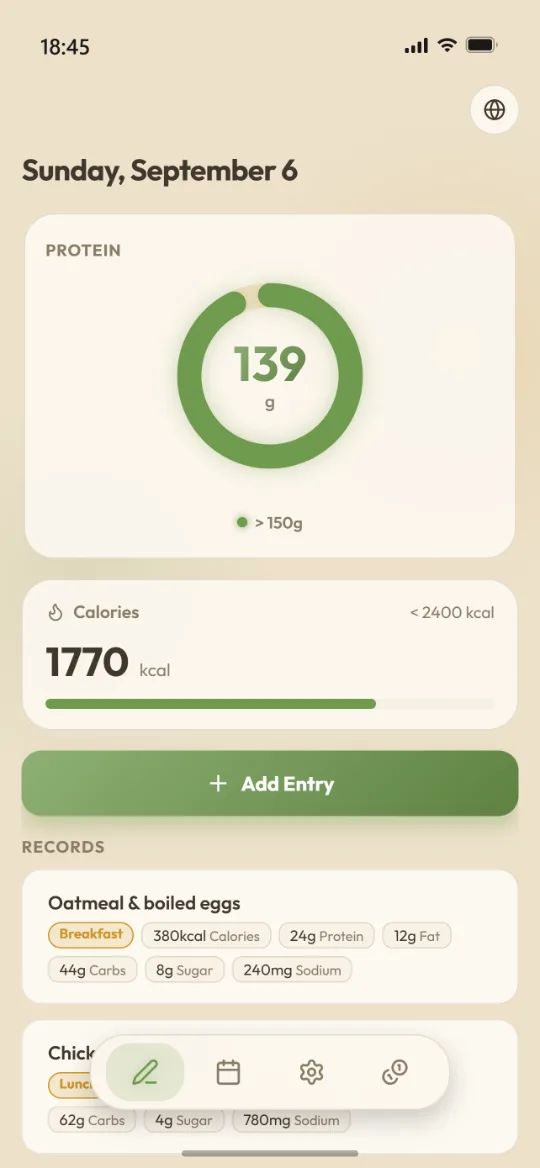
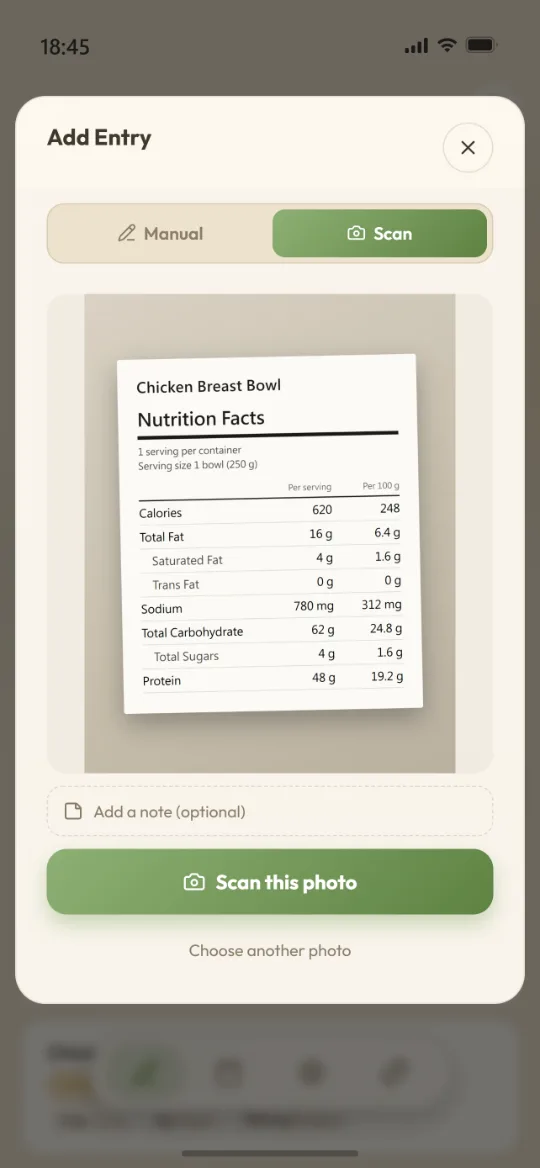
拍一張,再補一句
客製化你的辨識
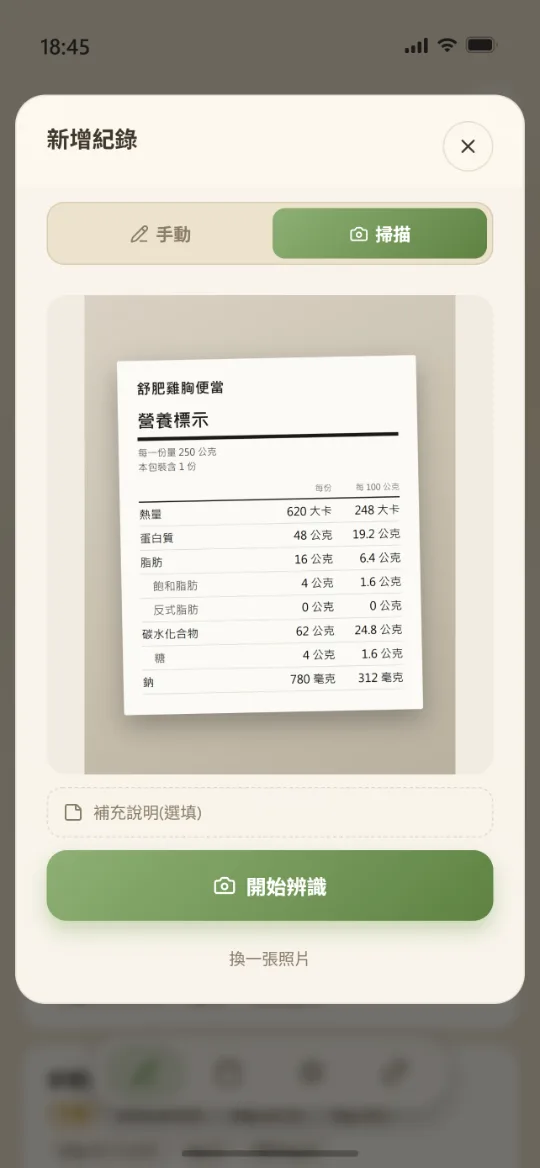
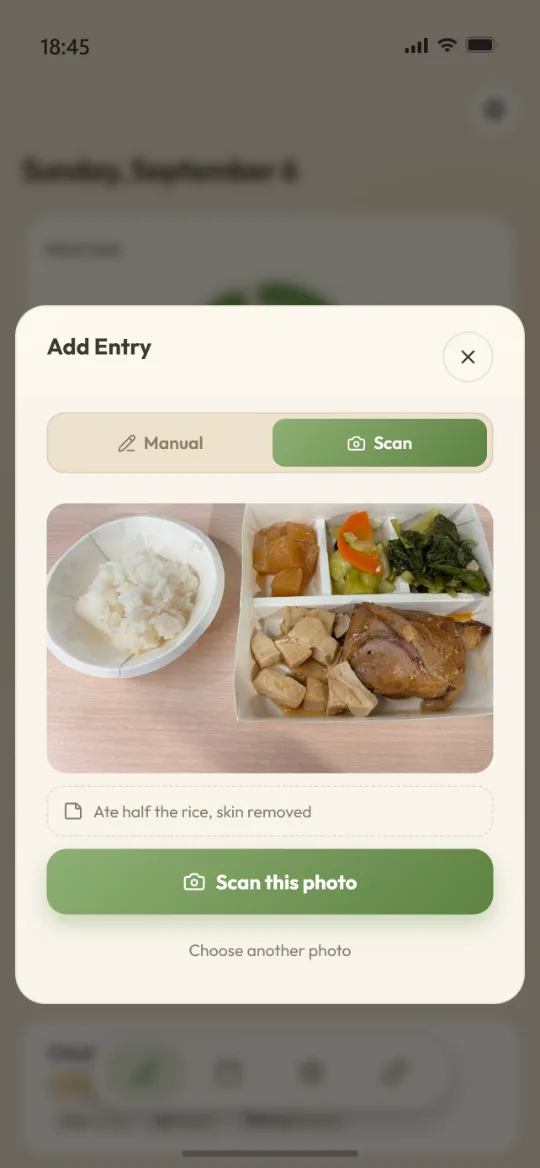
拍下包裝背面的營養標示,熱量、蛋白質、脂肪、飽和脂肪、反式脂肪、碳水、糖、鈉一次讀進來。送出照片之前,你還可以先補一句話告訴它該怎麼讀:「看每 100 公克那一欄」、「醬汁我沒喝」、「這盒我只吃一半」 —— 這句話會跟照片一起送出,直接引導它的判讀。
- 沒有標示的便當、自助餐,直接拍食物本身也能估
- 備註跟照片一起送出,最多 120 字,只影響這一次辨識
- 標示寫每份或每 100 公克都行,切過去填你吃的公克數,倍率它自己乘
- 也能指定照片拍到的是「我吃的」還是「剩下的」
- 辨識完的每個數字仍然可以手動改
A photo, plus a sentence
Customise the recognition
Photograph the panel on the back of the pack and calories, protein, fat, saturated fat, trans fat, carbs, sugar and sodium all come across at once. Before you send the photo you can add a line telling it how to read: "use the per-100 g column", "I left the sauce", "I only ate half the box" — it goes with the photo and steers the reading itself.
- No label on it? Photograph the plate itself and it estimates the meal
- Sent with the photo, up to 120 characters, and it only affects this one scan
- Per serving or per 100 g — switch to match the label, type the grams you ate, and the multiplier is done for you
- Say whether the photo is what you ate or what's left over
- Every recognised number stays editable afterwards
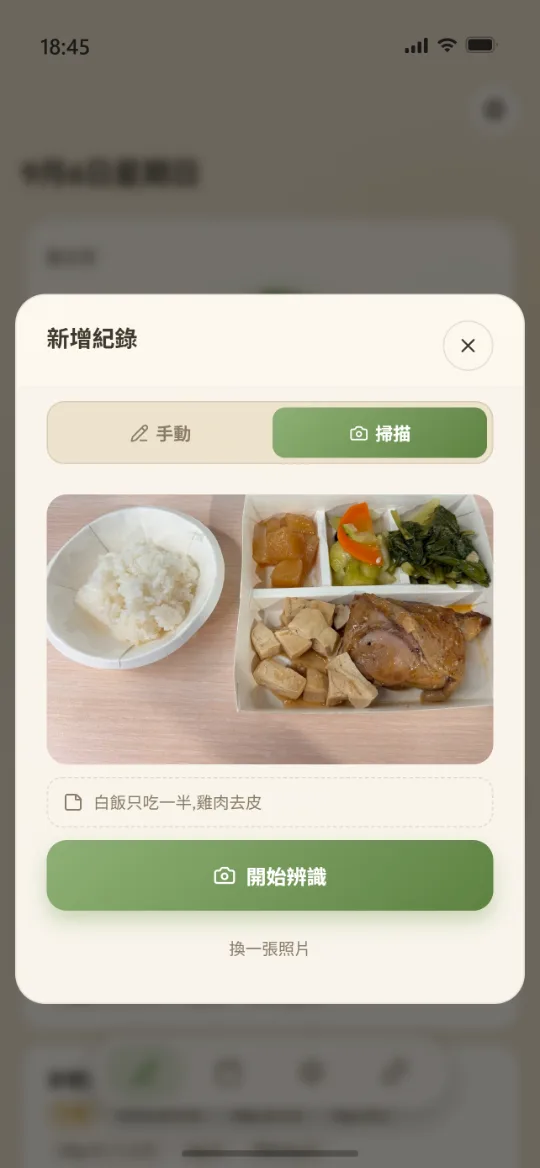
要花錢的只有辨識
記錄本身是免費的,而且沒有次數限制。只有拍照辨識這件事背後有 AI 成本,才需要次數。
手動記錄
無限次,不用付費也不用看廣告。
- 所有記錄、日曆、趨勢圖功能
- 我的最愛、餐別標籤、主題配色
- 匯出與匯入備份
- 新使用者贈送 5 次辨識
拍照辨識
一次辨識扣一次。三種次數包,價格以 App Store 顯示的當地售價為準。
- 90 次 / 300 次 / 600 次三種
- 買越多單次越便宜
- 一次性購買,沒有訂閱、不會自動續扣
- 也可以看一支廣告換 1 次
You only pay for recognition
Logging is free and unlimited. Only the photo recognition has an AI bill behind it, so only that runs on credits.
Manual entry
Unlimited, with nothing to pay and no ad to watch.
- All logging, calendar and chart features
- Favourites, meal tags, theme colours
- Backup export and import
- 5 free scans to start with
Photo recognition
One scan, one credit. Three pack sizes; your local price is the one shown in the App Store.
- Packs of 90, 300 and 600 scans
- Bigger packs cost less per scan
- One-off purchases — no subscription, nothing auto-renews
- Or watch one ad for one scan
越用越快
掃過一次,之後一鍵重複
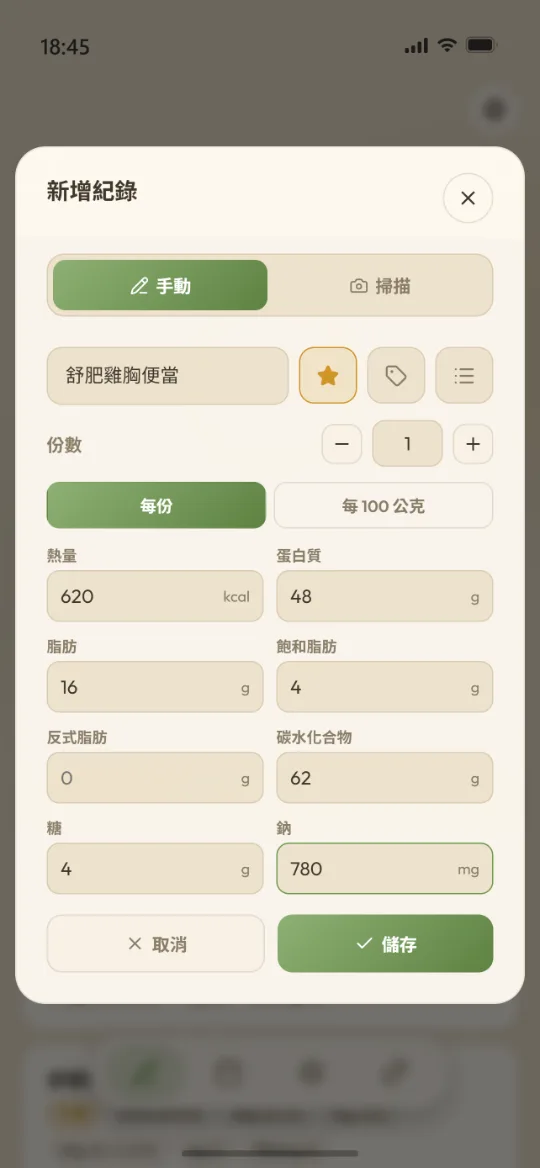
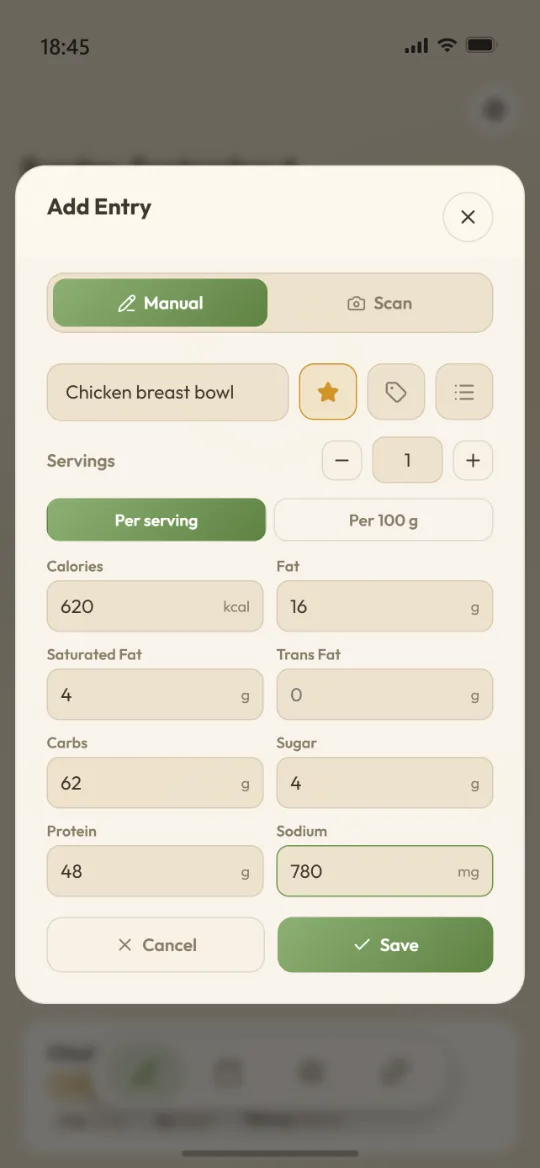
同一款優格不必掃第二次。辨識完按一下星號就存成常用,連「每份還是每 100 公克」的基準一起記住。下次從清單挑出來、改個份數就送出 —— 不花辨識次數,離線也能用。
- 常用項目可以分資料夾整理
- 手動輸入的東西一樣能存成常用
- 早餐 / 午餐 / 晚餐等餐別標籤可自訂與排序
Faster the more you use it
Scan it once, repeat it with a tap
You never scan the same yoghurt twice. Star a recognised entry and it is saved as a favourite — including whether it was per serving or per 100 g. Next time, pick it off the list, adjust the servings, done. No credit spent, and it works offline.
- Organise favourites into folders
- Anything you typed in by hand saves the same way
- Meal tags — breakfast, lunch, dinner — are yours to rename and reorder
幾件別家不太做的事
都是用起來才會發現差別的地方。
五種營養標示格式
台灣、美加、歐盟英國、日本、韓國。標的是鈉還是鹽、基準是每份還是每 100 公克,照你手上那張標示的樣子輸入就好;鹽與鈉之間的換算它會處理。
離線可用
除了拍照辨識需要連線,其他每一件事——記錄、查看、修改、匯出——飛航模式下照常運作。
不是訂閱制
記錄本身免費,辨識次數是一次性購買。沒有月費、不會自動續扣,也不會因為你停止付費,就把已經記好的資料鎖起來。
A few things most trackers skip
The kind of difference you only notice in daily use.
Five label formats
Taiwan, US/Canada, EU/UK, Japan, Korea. Sodium or salt, per serving or per 100 g — enter it exactly as the label in your hand is written; converting between salt and sodium is handled for you.
Works offline
Photo recognition needs a connection; everything else — logging, browsing, editing, exporting — keeps working in aeroplane mode.
No subscription
Logging is free and scan credits are one-off purchases. No monthly fee, nothing auto-renews, and stopping payment never locks away what you already logged.
看得到累積
歷史紀錄追蹤
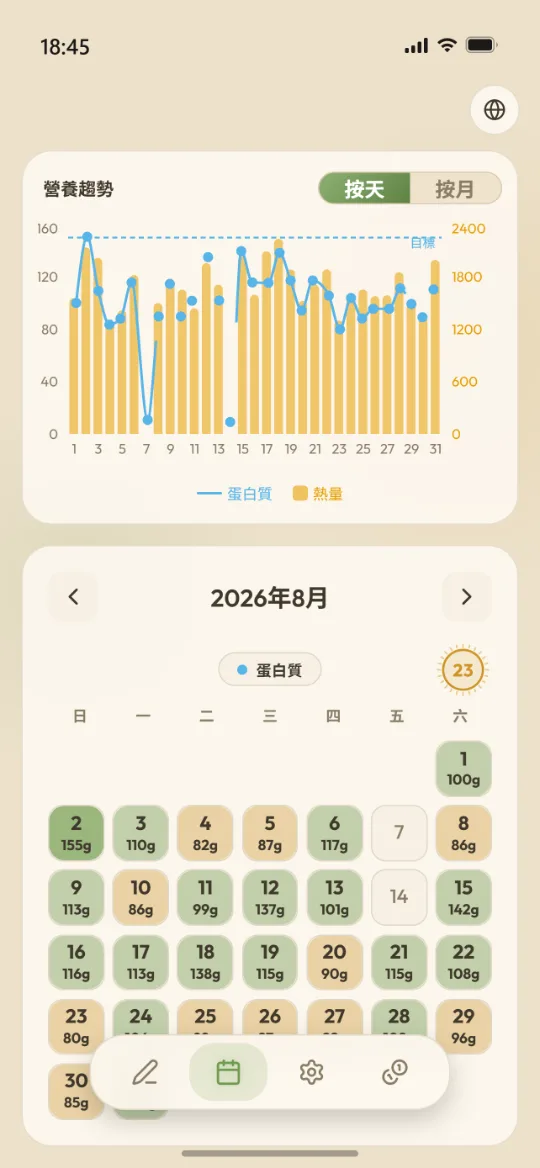
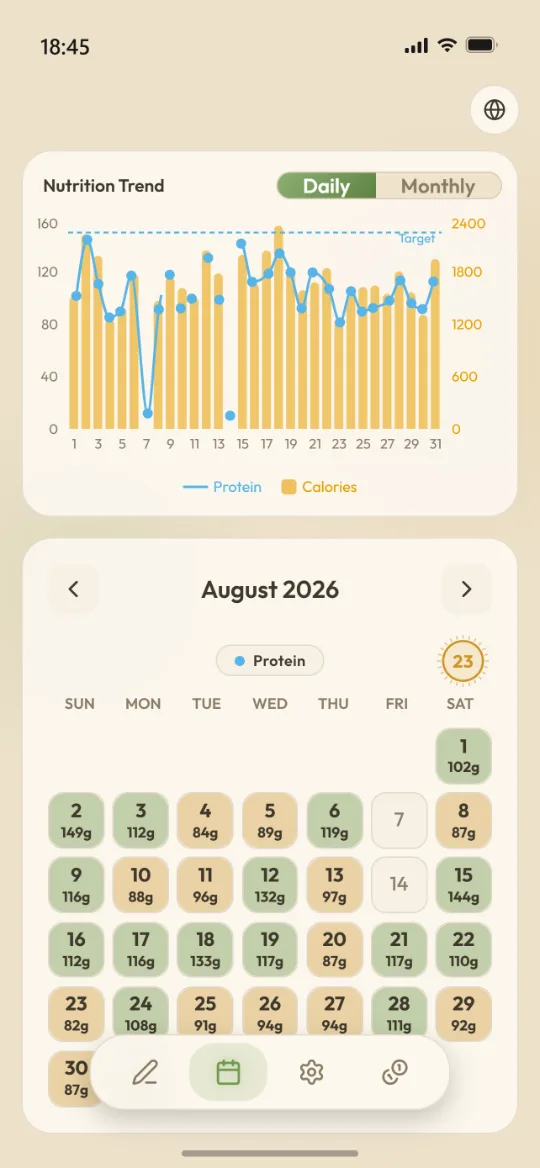
日曆上每一天的顏色深淺就是當天的達成度,點下去可以補記或修改過去任何一天。下方的趨勢圖可切每日或每月,自己挑要看哪幾項營養素。
- 連續紀錄天數,滿一週、滿一個月、滿百日都會給你一個提示
- 日曆顯示的指標可以換成你在意的那一項
See it add up
Track your whole history
Each day's shade on the grid is how close you got. Tap any past day to fill it in or fix it. The chart below switches between daily and monthly, on whichever nutrients you care about.
- A logging streak that marks your first week, first month and 100th day
- Pick which metric the calendar colours itself by
調成你的樣子
個人化目標與主題配色
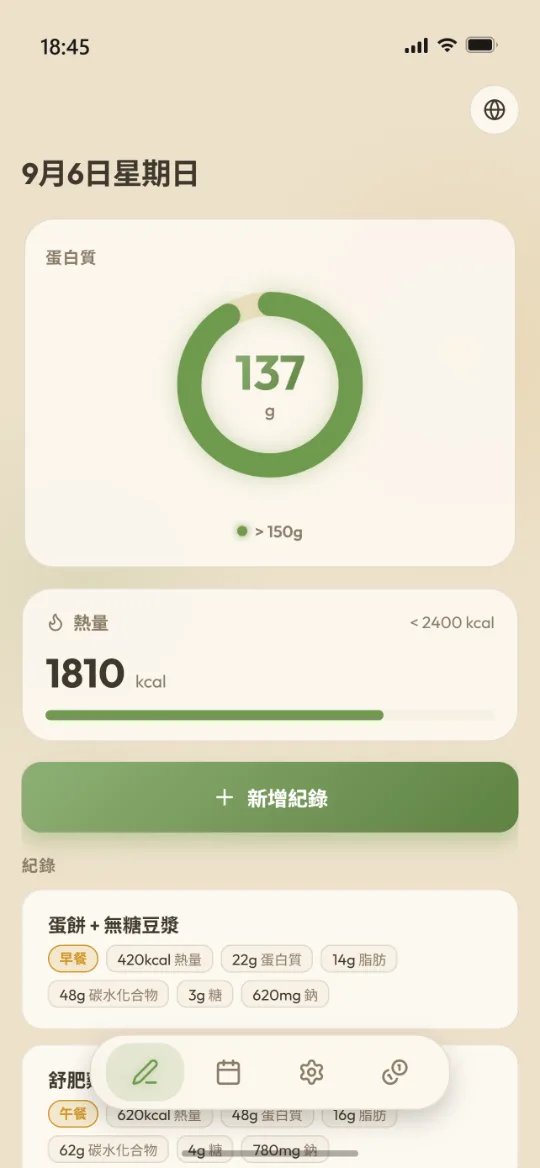
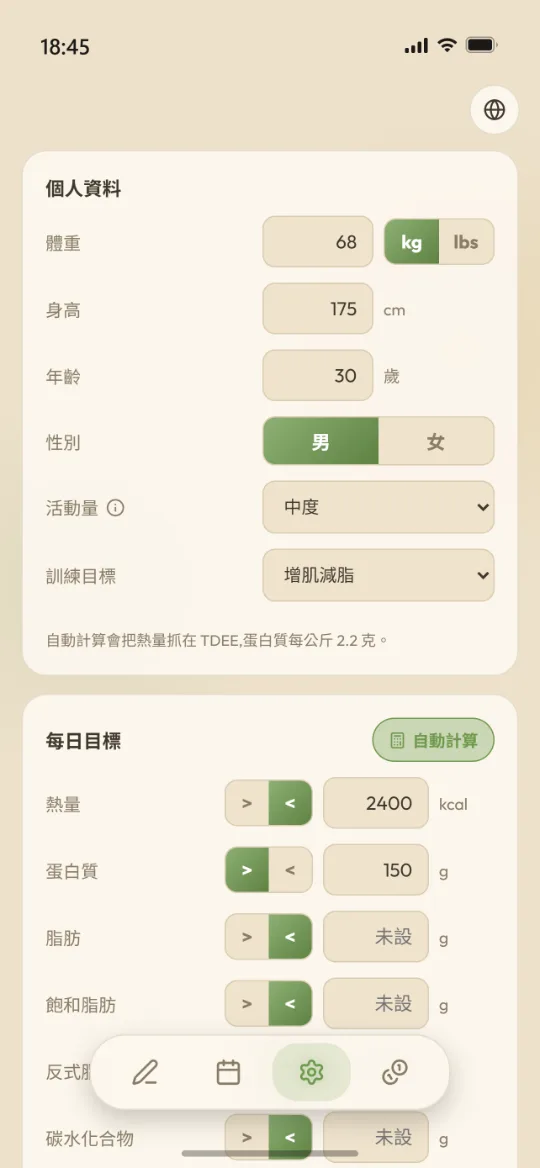
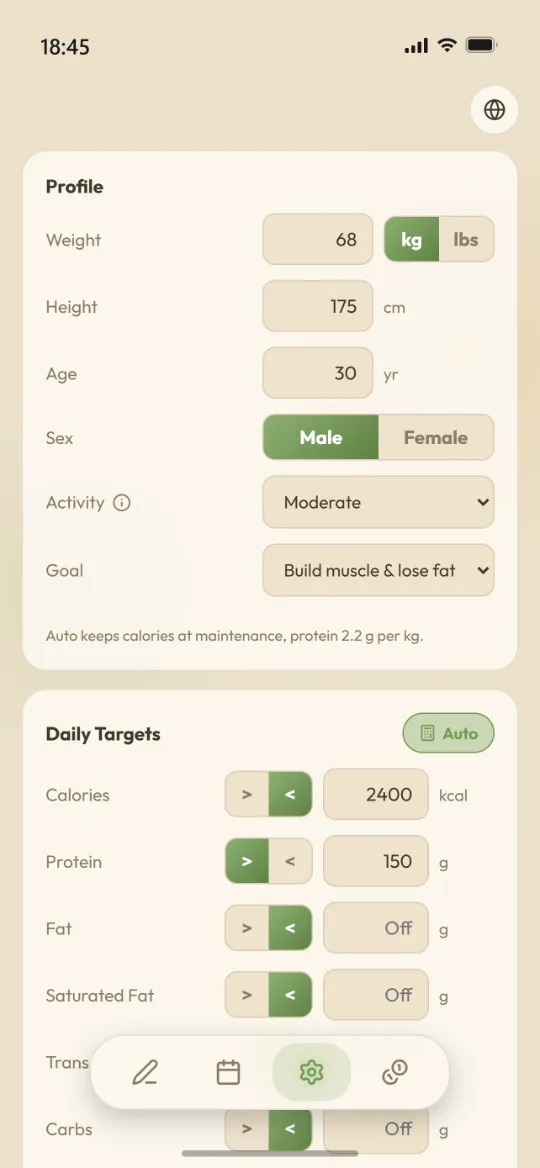
目標可以讓它自動算,也可以自己填死。首頁要顯示哪幾項營養素、趨勢圖要畫哪幾項、主色與強調色是什麼,都由你決定。
- 目標可以讓它自動算,也可以自己填死
- 主色與強調色可自訂,改完當場預覽
- 介面支援中文、English、日本語、한국어
Make it yours
Your targets, your colours
Let the targets be calculated, or pin them yourself. You choose which nutrients show on the home screen, which ones the chart plots, and what the main and accent colours are.
- Let the targets be calculated, or pin them by hand
- Main and accent colours are yours, previewed as you change them
- Interface in English, 中文, 日本語 and 한국어
資料安全
我們不蒐集你的個人資料
Makro 沒有帳號系統,也沒有放你飲食紀錄的雲端資料庫。你記的每一筆都寫在手機本機,不上傳、不同步、不會被拿去分析。
- 不用註冊、不用密碼、沒有社群登入,連 email 都不必給。
- 唯一會離開手機的,是你按下辨識的那張照片。辨識完就結束,不會留在我們的伺服器上。
- 伺服器上跟你有關的只有一組認不出是誰的識別碼,以及剩餘的掃描次數。
- 想帶走隨時匯出成 JSON;刪掉 app,資料就跟著消失。
Your data
We don’t collect your personal data
Makro has no account system and no cloud database holding your food log. Every entry is written to the phone's own storage — not uploaded, not synced, not mined.
- No sign-up, no password, no social login — we don't even ask for an email.
- The only thing that leaves your phone is a photo you chose to scan. Once it's read, that's the end of it — we don't keep it.
- All we hold server-side is an identifier that can't be traced back to you, plus your remaining scan credits.
- Export to JSON whenever you like; delete the app and the data goes with it.
常見問題
需要註冊帳號嗎?
不用。打開就能開始記,沒有註冊、登入或密碼這回事。
換手機的話紀錄會不會不見?
因為資料只存在裝置上,換手機前請到設定裡把資料匯出成 JSON 檔,在新手機上匯入即可。App 每個月也會提醒你備份一次。
辨識準不準?
營養標示這種印刷數字通常很準;拍整盤食物則是估算,份量與烹調方式都會影響結果。送出照片前補一句備註(例如「看每 100 公克那欄」)可以先把方向講清楚,辨識完的每個數字也都可以自己改。
沒有網路可以用嗎?
可以。只有拍照辨識需要連線,其餘功能離線都正常。
我的照片會被留下來嗎?
照片只在辨識當下傳送給服務商處理,不會保存在我們的伺服器上。細節寫在隱私政策。
有 Android 版嗎?
目前只有 iPhone 版。
Questions
Do I need an account?
No. Open it and start logging — there's no sign-up, no login, no password.
What happens to my logs when I change phones?
Since the data lives on the device, export it to a JSON file from Settings before you switch, then import it on the new phone. The app also reminds you to back up once a month.
How accurate is the recognition?
Printed nutrition panels come out reliably. A photo of a whole plate is an estimate — portion size and cooking method both move the numbers. Adding a note before you send the photo ("use the per-100 g column") sets the direction up front, and every recognised value stays editable afterwards.
Does it work without a connection?
Yes. Only photo recognition needs the network; everything else works offline.
Are my photos kept anywhere?
A photo is sent for recognition at the moment you scan it and is not stored on our servers. The details are in the privacy policy.
Is there an Android version?
Not yet — iPhone only for now.
Log today's meal first
Free to download, no account, set up in two minutes.
Download on the App Store